Astha: connect the people
behind a shared purpose.
A meeting place for NGOs, volunteers, and CSR partners.
From discovering a cause to building a credible organisation profile.
Find a way to contribute.
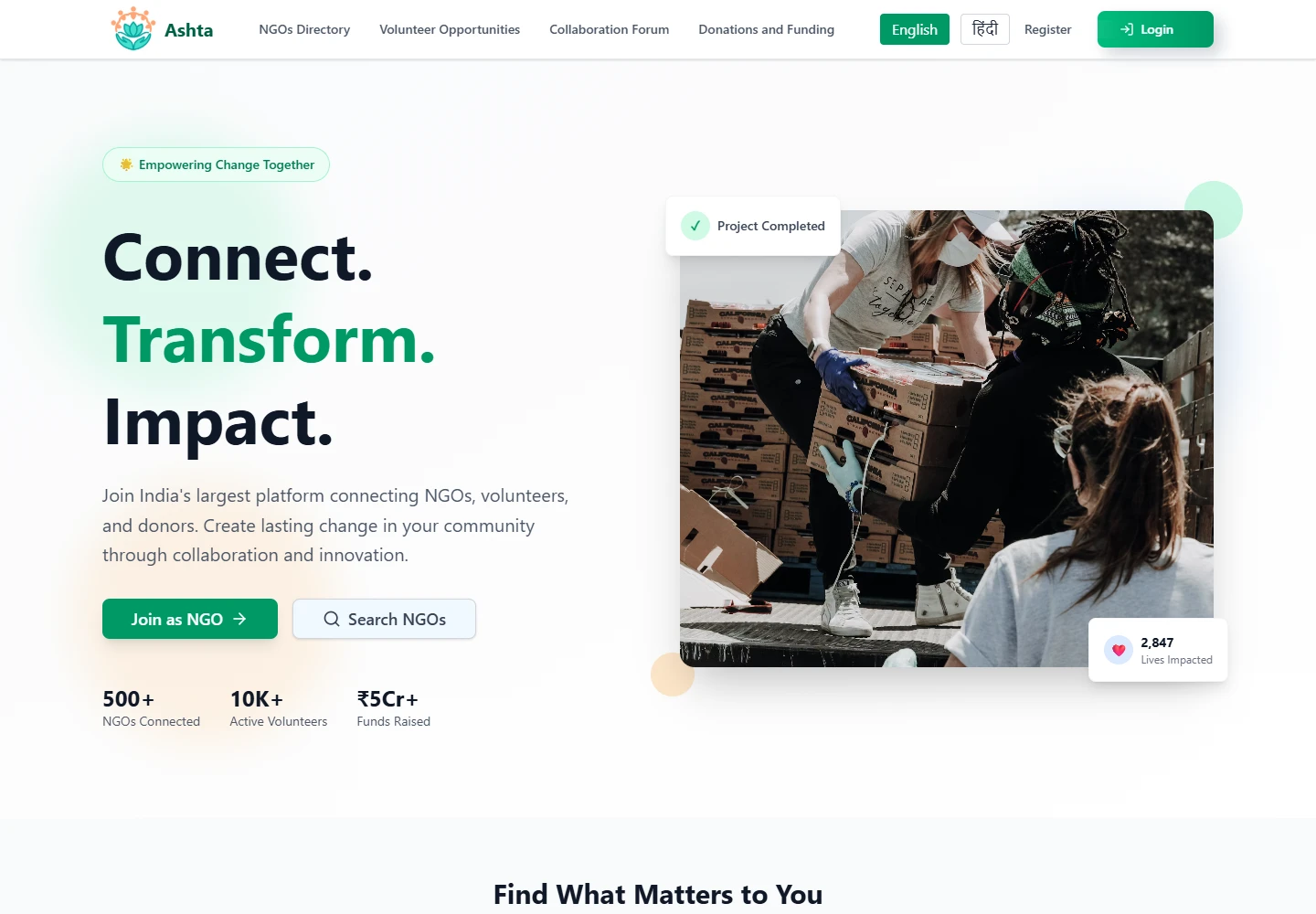
People want to contribute. Organisations need support. The difficult part is connecting the right person to the right mission—and giving both sides enough context to take the next step.
Astha brings NGO discovery, organisation profiles, structured registration, and role-specific workspaces into one platform. It has hosted real NGOs, including Mission Nidar and Humane Foundation Trust. Their photographs and programme records give the organisation stories a real community context.
- The project
- Social impact · NGO web platform
- The experience
- Discovery · Hindi translation · Onboarding
NGO, volunteer, CSR & admin views - Built with
- Next.js 15 · TypeScript · Supabase
Tailwind CSS · Zustand · Cloudflare R2
A common purpose.
Different starting points.
A volunteer looks for a cause and a practical way to help. An NGO needs to explain its mission, share its requirements, and establish an organisation profile. A corporate partner approaches the same ecosystem through CSR programmes and collaborations.
The platform separates these roles while keeping a shared public discovery experience. An admin workspace supports the organisation review side of that journey.
Volunteers
Explore organisations, discover requirements, and see a workspace for activity and participation.
NGOs
Register the organisation, collect evidence, and manage its profile, events, and collaborations.
CSR partners
Enter through a corporate registration flow and a workspace for partnerships and initiatives.
Make the mission visible.
Make the next step clear.
The original interface uses emerald actions, pale surfaces, and generous cards. Photography gives the public pages a human context; badges, contact details, and requirements give that context structure.
The landing page leads with two concrete choices: join as an NGO or search for organisations. The directory narrows the choice through search and filters. Inside an organisation, tabs separate the mission, current requirements, and contact information.
Open, human,
and organised.
Soft backgrounds.
Clear actions.
Room for the mission.
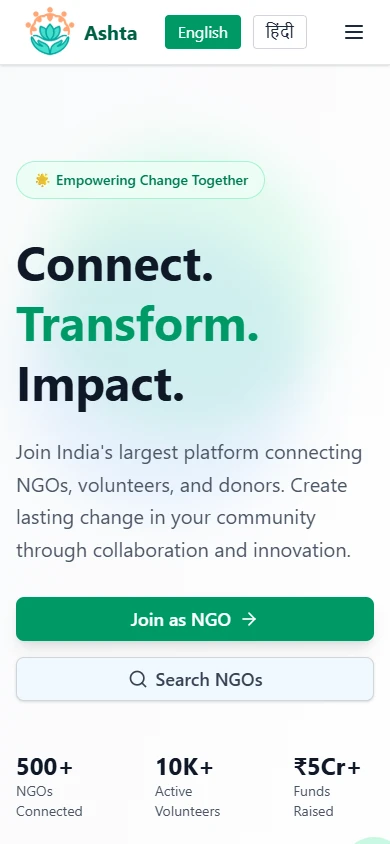
Action before abstraction
Specific entry points give organisations and contributors a place to start.
Information in layers
Directory cards support comparison; profile tabs carry the detail needed to continue.
A wider audience
Responsive layouts and a working Google Translate layer make English and Hindi part of the same experience.
Hindi across the page.
A language choice that works.
For a platform connecting local organisations and contributors, language is part of access. Astha’s English and Hindi controls connect to a real Google Translate layer that translates rendered page content, including navigation, discovery copy, and filter labels.
The root layout loads Google’s Translate Element with English as the source language and Hindi as an included language. Selecting Hindi saves /en/hi in the googtrans cookie and reloads the page. The switcher reads that preference when it mounts, so the selected state follows the saved choice.
Switching the locally running directory to Hindi changed its heading from “Find Your Perfect NGO Partner” to “अपना आदर्श खोजें / एनजीओ भागीदार”, alongside the navigation and discovery controls. The screenshots below show the same page before and after that change.
Choose Hindi
The visitor uses Astha’s own language control.
Remember the choice
A cookie stores the English-to-Hindi preference.
Translate the page
Google Translate applies the language after reload.
A shared experience in two languages.
The integration translates the rendered interface through Google’s service. Organisation records stay in the same data model, and the original language can be restored through the English control. Machine translation quality depends on the content and service; organisation names and critical instructions benefit from review.
Find a cause.
Understand the organisation.
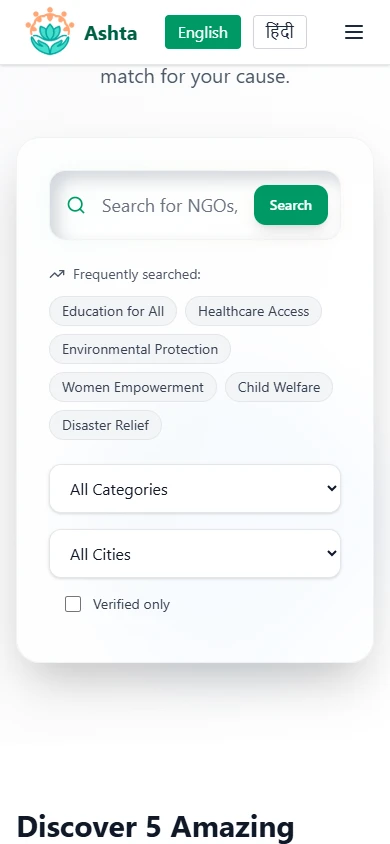
The directory searches organisation names and descriptions, then combines category, city, and verification filters. Opening a profile brings the organisation’s mission, focus areas, location, and contact details into view.
Requirements are connected to the organisation. This turns discovery into a more specific question: what does this NGO need, and where might my contribution fit?
Captured by running the downloaded repository locally. Directory records and dashboard totals are sample data from the source; they describe the prototype, not measured deployment results.
The people and programmes
behind the profiles.
Mission Nidar and Humane Foundation Trust are real NGOs the website has hosted. Their work gives the platform a concrete purpose: help people understand an organisation through its mission and the activities it carries out.
This showcase brings selected photographs and press coverage into the portfolio’s interface. Mission Nidar’s material documents safety awareness and school workshops; the Humane Foundation Trust deck records environmental programmes and community support. Explore either organisation below.
Mission Nidar
Mission Nidar’s work centres on women’s safety, self-defence, and awareness. Its photographs and Hindi press coverage show community campaigns, school workshops, and conversations about personal and digital safety in Kanpur.
Photo gallery
1 / 6Photographs, press clippings, and the Humane Foundation Trust journey deck supplied by the project author.
Give the organisation
a structured introduction.
NGO registration is divided into point-of-contact details, organisation information, and document uploads. The form carries the current data between stages, so the organisation can build its profile one part at a time.
The organisation stage captures registration and PAN details, location, founding year, focus areas, and mission. Separate upload slots keep each supporting document attached to a named purpose.
Introduce
Point of contact
Describe
Organisation & mission
Support
Document evidence
Review
Admin verification
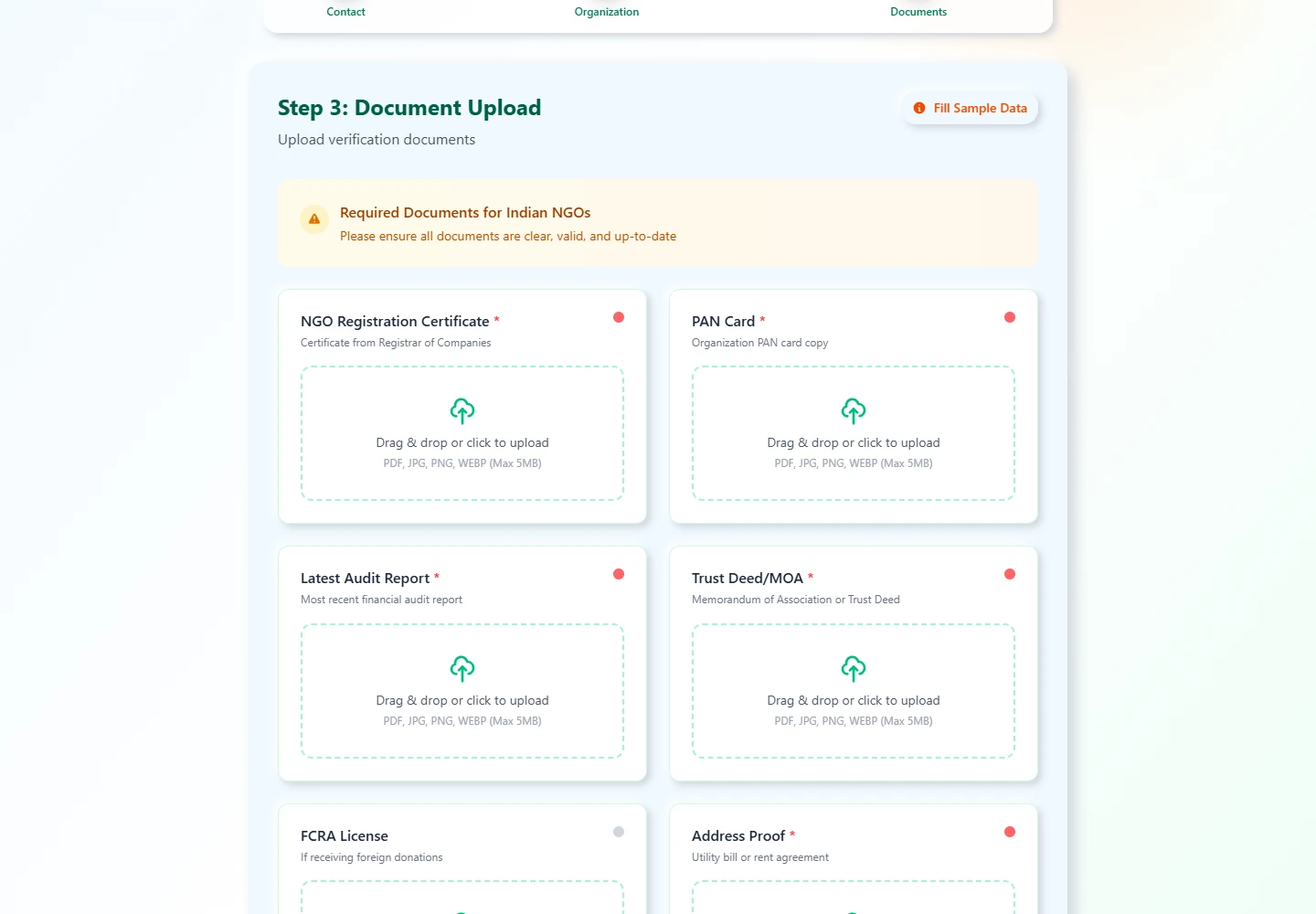
Evidence and review stay connected.
The implementation provides slots for registration, PAN, audit, trust, FCRA, and address documentation. Its upload route validates file type and size before writing to Cloudflare R2.
The admin request view brings organisation and contact information together with document previews. Approval updates the organisation’s verification flag. The NGO sidebar reads its document completion and verification state to show what remains to be done.
Profiles, documents,
and the work between them.
The application uses Next.js 15’s App Router and TypeScript. Tailwind CSS, Radix UI components, and Framer Motion support the interface. React Context carries onboarding form data; Zustand persists the role and authentication-related state.
A form becomes an organisation record.
The onboarding context builds a typed payload and calls the insert_ngo_details database function. Document URLs are included with organisation and point-of-contact data, keeping the files connected to the record they support.
Language is applied at the experience layer.
The root layout mounts GoogleTranslateWrapper and the shared navigation includes LanguageSwitcher. The wrapper loads Google’s translation script, while the switcher persists the language choice and triggers a reload. Translation runs on the rendered page rather than creating duplicate NGO records.
Review changes a visible state.
Server actions fetch organisation requests and supporting profile information. Approving a request sets verified to true and updates the timestamp; the reviewed rejection action returns that flag to false.
A prototype with explicit integration boundaries.
The repository includes Supabase authentication methods and schema work. In the reviewed snapshot, auth initialisation and middleware checks are disabled for the prototype, and public directory records are local fixtures. Enabling production access controls and connecting discovery to live records are further integration steps.
Explore the implementation Directory, onboarding, review & document storage
Search, combined filters, organisation pages, and linked requirements.
Form stages, document slots, typed payloads, and the registration RPC.
Organisation request retrieval and verification-flag updates.
Google Translate Element, English/Hindi controls, cookie persistence, and page reload.
File validation, R2 upload, and document preview helpers.
A clearer path
from interest to participation.
Astha connects discovery, organisation identity, onboarding, and role-specific management. Its real NGO stories bring the community work into view, while the working Hindi translation layer gives visitors another language in which to explore that journey.
Discover with context
Find an organisation, understand its mission, and inspect what it needs.
Introduce with evidence
Turn organisation and contact information into a structured registration record.
Continue in a workspace
Give each role a view of the activity and responsibilities it brings to the platform.
The platform’s contribution is to make an organisation’s work easier to discover and understand. The community programmes shown here belong to the NGOs. A further evaluation would follow visitors through discovery and registration, including the Hindi experience, to see where people need clearer information.
Explore Astha.
Visit the project’s linked deployment or continue through the portfolio.